


Buffer & Medium Calculator

Loading…

Step 1

Set the final volume

Step 2

Add components (stock or powder)

Step 3

Read volumes & weigh-outs

Step 4

Copy, export, or save (sign in)

Online buffer & medium calculator

Use the website when you need a buffer recipe fast — how many millilitres of each stock, how many grams of each powder, and how much solvent to top up with. No install, no account. Sign in to keep saved recipes synced with the Lab Laps mobile app.

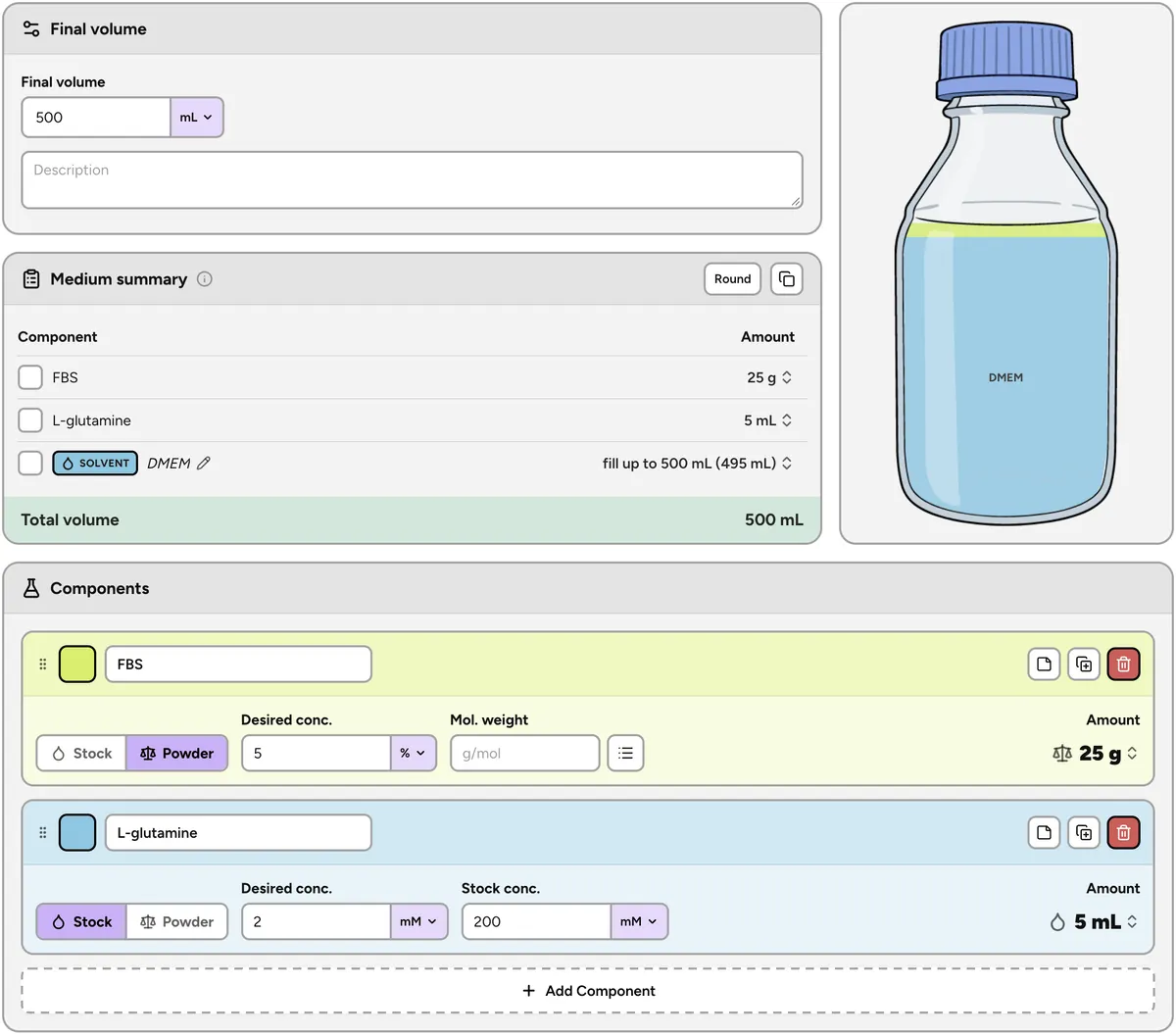
Lab Laps buffer calculator with stock volumes, powder weigh-outs, and solvent

About this buffer calculator

This free online buffer calculator turns a target recipe into bench numbers. Enter the final volume, then list each component with the concentration you want: from a stock it returns the volume to pipette (C1V1 = C2V2 per component), from a powder it converts molarity and molecular weight into a mass to weigh out. The summary shows every component plus the solvent needed to reach the final volume, and warns you if the stock volumes overflow the bottle. Works for lysis buffers, running and transfer buffers, PBS or TBS variants, and cell culture media supplements.

How it works

  1. 1Enter the final volume of buffer or medium you want to make.
  2. 2Add each component as a stock solution or a powder with its molecular weight.
  3. 3Tick components off at the bench, copy the table, or sign in to sync saves.

Who is this for?

Researchers, students, and lab teams who prepare buffers, media, and reagent mixes: molecular biology and biochemistry benches, cell culture rooms, microbiology labs, and anyone tired of re-deriving a buffer recipe in a spreadsheet.

Buffer calculator FAQ

Is the Lab Laps buffer calculator free?

Yes. The public buffer and medium calculator is free and needs no login. Set your final volume, add each component as a stock solution or a powder, and read off how much of each to pipette or weigh — plus how much solvent to top up with.

How do I calculate a buffer from stock solutions?

Choose "Stock solution" for a component, enter the concentration you want in the final buffer and the concentration of your stock (for example 1 M Tris or a 10x salt stock). The calculator applies C1V1 = C2V2 for that component and returns the stock volume to add for your final volume.

How do I calculate how much powder to weigh out?

Switch the component to "Powder", enter the desired concentration and the molecular weight (or pick the chemical from the built-in MW list). The tool converts molarity to mass for your final volume, so you get grams or milligrams to weigh out. Percent (% w/v) and mass/volume units like mg/mL work without a molecular weight.

Which units does the buffer calculator support?

Molar units (M, mM, µM, nM), mass/volume units (mg/mL, µg/mL, g/L), percent, and fold stocks such as 10x or 50x. Final volume can be set in µL, mL, or L. Mixing unit types across components in the same recipe is fine.

Can I use it for cell culture media, not just buffers?

Yes. The same sheet works for media preparation: add supplements such as FBS, antibiotics, L-glutamine, or HEPES as stock components, and the solvent row shows how much base medium to add to reach the final volume.

Does this page save my buffer recipes?

No. This public page keeps your recipe in the browser tab only — nothing is saved to an account. For saved recipes that sync with the Lab Laps mobile app, sign in and use /app/medium-buffer.

What if a component needs more volume than the buffer has?

The calculator warns you when your stock volumes add up to more than the final volume, so you catch an impossible recipe (a stock that is too dilute) before you start pipetting.

Lab Laps

Download Lab Laps and keep your timers, protocols, and tools together in one app.