

• Free
  • No login
  • Export PNG/PDF

Free Online Plate Labelling

Loading…

Step 1

Choose plate type

Step 2

Select wells

Step 3

Add labels & colors

Step 4

Export PNG/PDF

Online plate labelling

Use the website when you need a quick well map — samples, conditions, or replicates — without installing an app or creating an account. Label wells, color-code the layout, and export for the bench or your lab notebook.

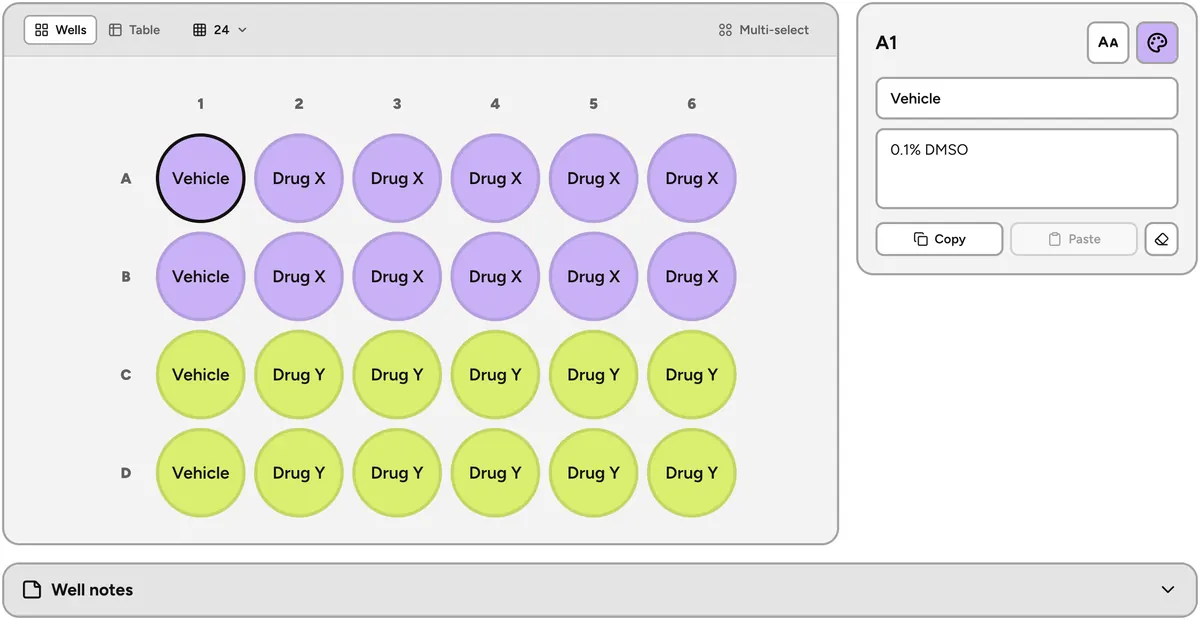
Lab Laps plate labelling workspace with a color-coded 24-well dose-response layout

About this plate labelling tool

This free online plate map helps you label wells in the browser. Pick a 6-, 12-, 24-, or 96-well plate (or a custom size), add titles, descriptions, and colors, multi-select or copy/paste across wells, then export a PNG or PDF — including an optional notes table for printouts.

How it works

  1. 1Choose a plate type (6 / 12 / 24 / 96 wells, or custom).
  2. 2Select one or more wells on the map.
  3. 3Add labels and colors, then export as PNG or PDF.

Who is this for?

Useful for researchers, students, and lab teams who map samples onto multiwell plates — ELISA, cell culture screens, PCR layouts, or any experiment where a clear well map beats a handwritten grid.

Plate labelling FAQ

Is the Lab Laps plate labelling tool free?

Yes. The public plate labelling page is free and does not require a login. Choose a plate type, label wells with titles, descriptions, and colors, then export a PNG or PDF from your browser.

Which plate formats are supported?

You can use common formats such as 6-, 12-, 24-, and 96-well plates, or set a custom plate size when your layout does not match a standard format.

Can I label several wells at once?

Yes. Multi-select wells to apply the same title, description, or color in one step. Copy and paste labels across wells when you need the same layout in another region of the plate.

What can I export?

Export a PNG of the plate map, or a PDF of the layout — optionally with a notes table that lists well labels for printing or sharing with your team.

Does this page save my plate projects?

No. This public page keeps your map in the browser session only (cleared when the tab closes). For saved projects that sync with the Lab Laps mobile app, sign in and use /app/plate-labelling.

When should I use the signed-in workspace instead?

Use the public page for a quick, no-login plate map. If you are already signed in, the page points you to /app/plate-labelling so you can work on saved projects. Use the signed-in web workspace or the mobile app when you need reusable projects, folders, and sync across devices.

Lab Laps

Download Lab Laps and keep your timers, protocols, and tools together in one app.